Production monitoring and job tracking that gives transparency & visibility to the whole organization. Measure real times, keep orders flowing and always be audit-ready, without changing how you work.
Epifor's Production Monitoring & Job Tracking shows what is happening on your shop floor as it happens. Operators use production terminals such as Tablets, PCs or Smartphones to execute the production plan. Every action is recorded, so your production data stays accurate and audit-ready.
Production Monitoring
See the whole floor, live
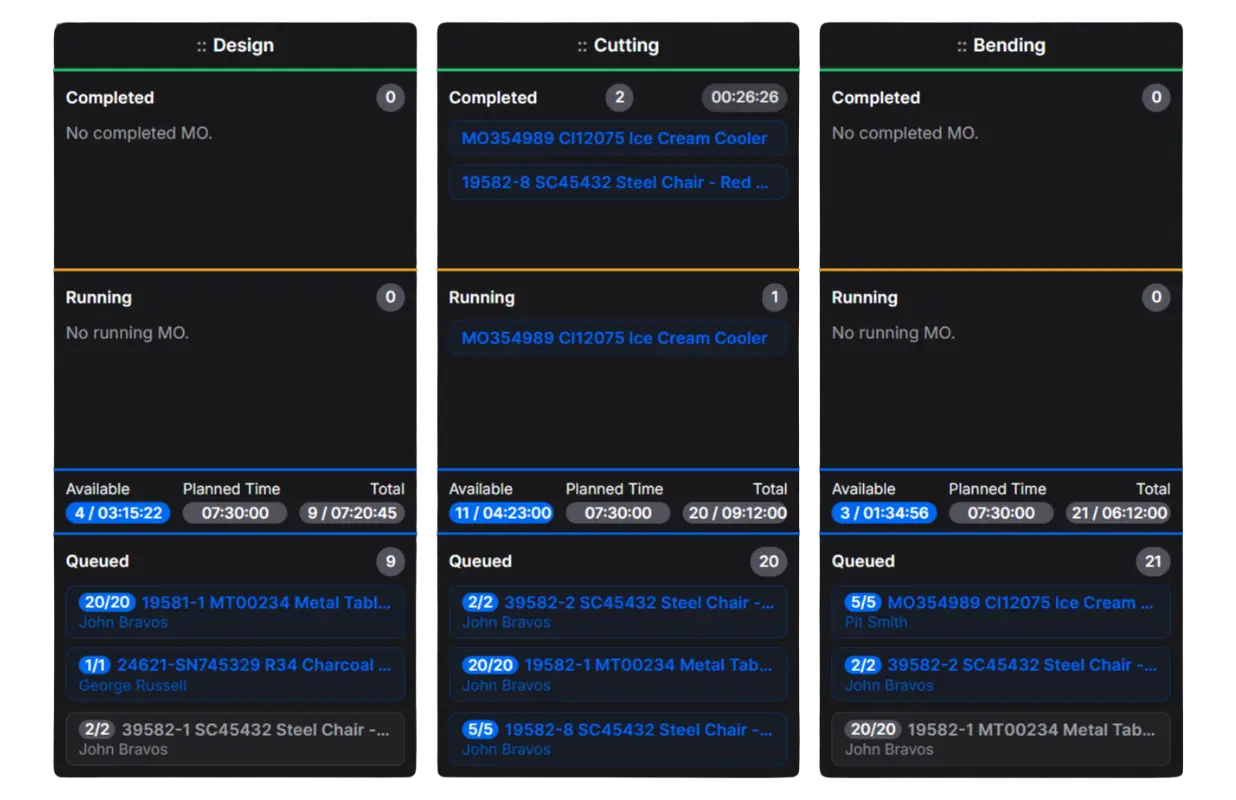
One board for every workstation, job and order, shared by the floor and the office. Color-coded status shows what is running, what is queued and what is ready to move next.
Live status by workstation
Completed, running, queued
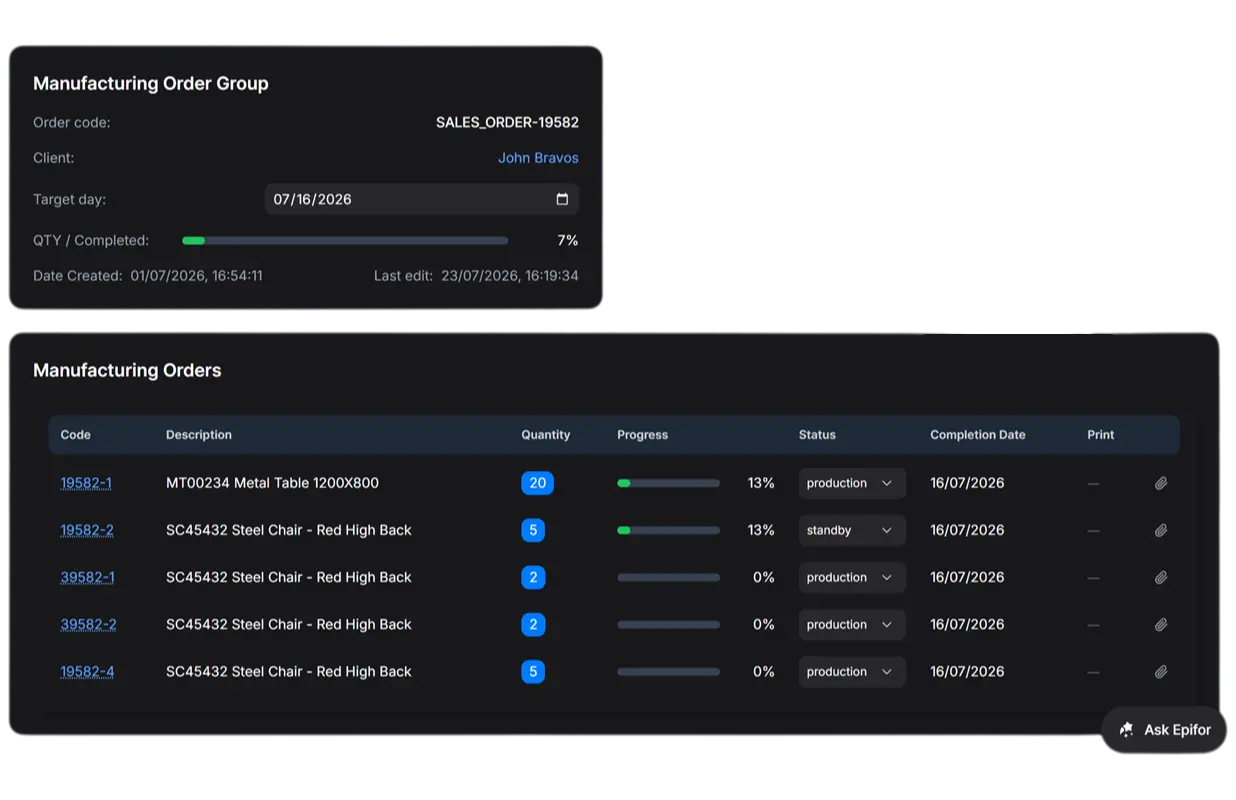
Order progress at a glance
Know exactly where each order stands
Monitor your operators
In color code see what your operators are doing in real time
Job Tracking & Time
Real times, captured at every workstation
Operators start a job, run it and close it from one screen. Every minute of labor and machine time recorded. Travelers go paperless and times reflect what actually happened.
Start and stop in a tap
Capture real labor and machine time per operation
Cycle and takt time per station
Measured from real production
Times flow onward
Accurate data feeds planning and costing automatically
Barcode Tracking & Labels
Scan, run, label
Identify every job and material on the floor, pull the right parts and print labels right at the station.
Scan to open a job
The right operation and drawing appear instantly
Scan to pick materials
Usage and remnants update on the job
Print a label
Generate job or material labels on demand
BOMs & Custom Fields
Every job carries its own detail
The bill of materials, drawings and the exact fields your process needs, attached to the job.
Bill of materials on the job
Parts and quantities, right where work happens
Drawings and files attached
Operators see what they need at the station
Custom fields your way
Lot numbers, inspection notes, anything customers ask for
Organize & recall
Tags
Organize once, find fast
Tag jobs, items and operations so the right people surface the right work in seconds.
✓Tag anything. Jobs, items and operations.
✓Filter instantly. Surface the right work fast.
✓Shared vocabulary. Everyone uses the same tags.
Library
Save once, reuse everywhere
Keep reusable steps, instructions and documents in one shared library.
✓Reusable templates. Steps, instructions and documents.
✓Apply in seconds. Drop a template onto a new job.
Open any past job and see who ran it, how long each step took and what was used.
✓Full job history. Operators, times and materials per step.
✓Compare over time. Set better benchmarks and quote with confidence.
✓Audit-ready, always. Proof for ISO and customer audits on demand.
Frequently asked questions
Q.01What is production monitoring and job tracking software?
It is software that shows what is happening on the shop floor in real time and records every job as it runs. Operators run jobs from a station screen; managers, planners and sales see the same live status from anywhere. In Epifor, it is a core part of the MES that keeps your production data accurate and audit-ready.
Q.02Does Epifor replace my ERP?
Epifor works alongside your ERP. Your ERP plans orders and handles transactions; Epifor runs and proves what happens in production. Orders flow from the ERP into Epifor and real times, materials and status flow back — so planning, costing and quoting use real data.
Q.03Does this monitor my operators?
Epifor gives your team shared visibility of the work (jobs, orders and flow) not surveillance of people. Times measure the process, so planners can balance the line and allocate orders without changing how operators work. Operators get the drawing at the right station and always know what comes next.
Q.04What devices does it run on?
Epifor runs in the browser, so it works on any tablet, terminal, or computer on the floor. There is no special hardware to install. You can mount the live board on a screen above the floor for the whole team to see.
Q.05Will my operators actually use it?
Yes. The operator screen is built to be simple, usually a scan and a tap or two. Operators get clear instructions and the right drawing for each job, which makes their work easier, not heavier. Most teams are productive on it within their first shift.
Q.06Does it work for manual assembly, or only machine shops?
Epifor works very well for manual assembly. It captures real times across every workstation, gives operators the designs and steps they need and shows where each order stands in the line. That makes it a strong fit for labor-intensive and custom manufacturing.
Q.07What data does job tracking capture?
Epifor records labor and machine time per operation, materials and remnants used, scrap, custom fields, operator notes and live job status. All of it is tied to the job and available in real time and in history. That data feeds your costing, planning and audit records.
Q.08Is the data audit-ready for ISO and customer audits?
Yes. Every job keeps a complete, traceable record of who ran it, how long each step took and what materials were used. You can open that history at any time, so you can prove what happened in production instead of explaining it.
Free online presentation
See Epifor on your own shop floor
Book a presentation. We'll show production monitoring and job tracking on real examples based on your floor and answer your questions live.

%20(1).webp)
.png)