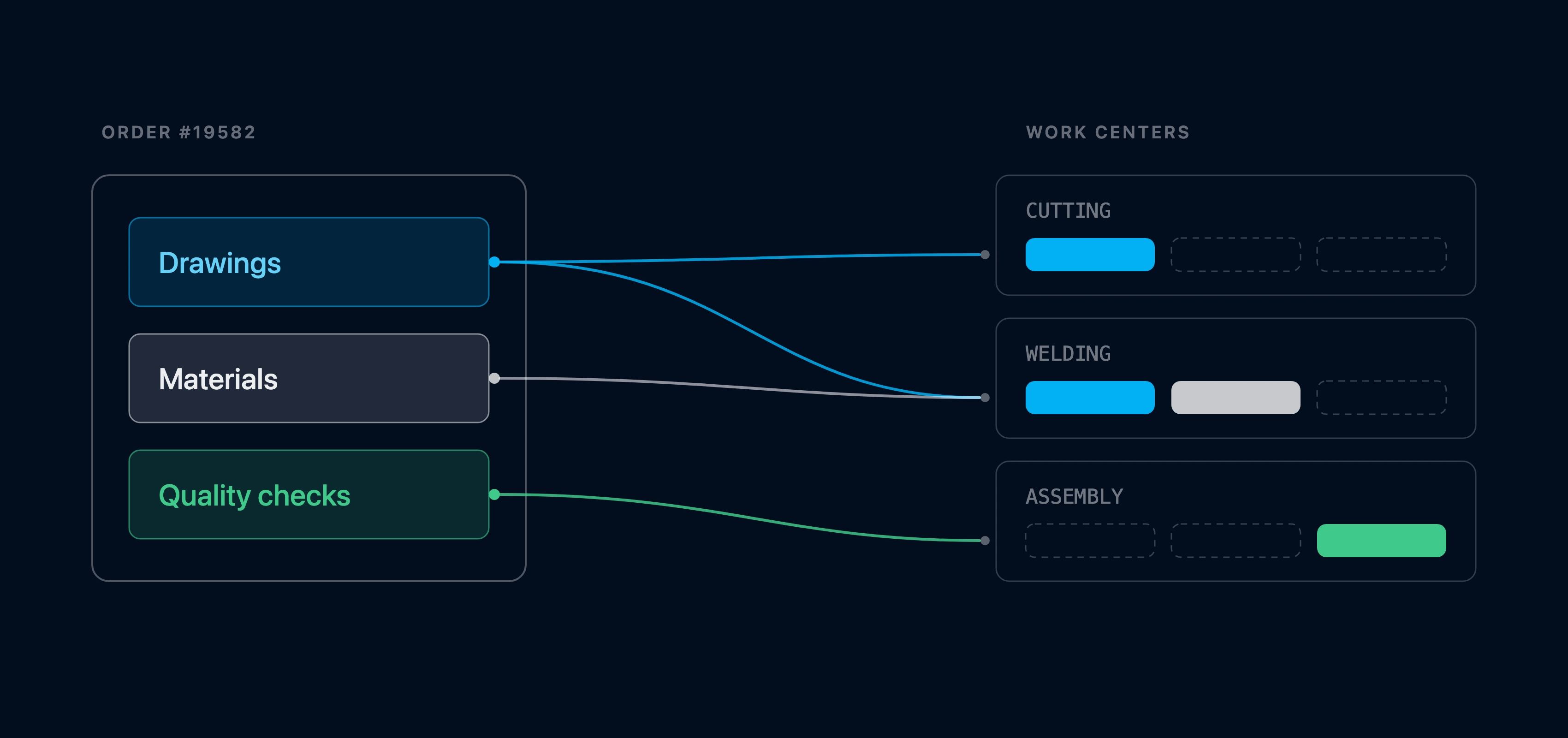
Go paperless by showing at every work center only what it needs
Epifor distributes characteristics, sales attributes, materials, technical drawings and quality fields to the work centers that needs them, not to all. Each work center gets the specs to build its own job, minimizing human errors and reduce informational confusion.
With Epifor's Advanced Information Distribution you can configure all the information that operators needs to see at each work center separately. Instead of pushing the whole job packet everywhere, each operator has less to read, fewer chances to pick the wrong part or miss a check, and a clearer view of the work in front of it.
Information Distribution Mechanism
Proper information at the right work center
The mechanism can be configured from the UI or called from the API depending on the approach and where the information is maintained. Initially all the information is displayed everywhere and then you can declare who sees what and who fullfiles what by configuring the field itself or the group of the field.
Product charactreristics, sales specs, such as dimensions and color, technical drawings and work instruction shown only at the work centers that need them
Bill of Materials
The relevant bill of materials at the work center, synced from your ERP, with operators recording what they actually used
Quality Fields & Alarms
All the control plan such as checklists, measurements, validations and more are shown to operator that must be acknowledge at their work center before the order can move on
Frequently asked questions
Q.01What is Advanced Information Distribution?
It is Epifor deciding which information reaches which work center, rather than showing every operator the whole job. Inside the shop floor management system, each work center receives only the characteristics, BOM lines and quality fields its own step needs.
Q.02What information gets distributed?
Three kinds, all set up as fields in Epifor: characteristics that describe the product, the bill of materials a work center consumes and the quality checks it has to record. Each work center gets only its relevant share.
Q.03How do I control what each work center sees?
You assign fields to work centers and apply the setting across your workflows with a rule. You configure it once, and Epifor puts the right characteristics, BOM lines and quality checks in front of the right work center on every order.
Q.04Can a quality check block an order from moving on?
Yes. A required check can be set so the operator must acknowledge it at that work center, and until they do, the order cannot pass to the next one or be completed. The check becomes a safeguard, not just a note.
Q.05Where do the BOM values come from?
The bill of materials can sync from your ERP, so the work center sees the value that came from ERP and the operator records what was actually used against it. That keeps the shop floor and your ERP consistent.
Q.06Why not show everything to every work center?
Because it slows operators down and invites mistakes. A full job packet everywhere makes it easier to read the wrong spec, pull the wrong part, or miss a check. Sending only what a work center needs keeps its screen short and its work clear.
Q.07Does this work with multi stage products?
Yes. Each stage runs at its own work center and receives its own characteristics, BOM lines, and quality fields, so a semi-finished stage sees its information and the final stage sees its own.
Q.08Is the full information still recorded?
Yes. Distribution controls what each work center sees, not what the system keeps. Every characteristic, material, and quality result is stored against the order for traceability, even though each work center only handled its part.
Free online presentation
See it at the work center
Book a short presentation and see how Epifor sends the right characteristics, BOM lines and quality fields to each work center, so every operator sees exactly what their step needs, all inside one shop floor management system.