Tighter control over resources, people, and output
Epifor adds more ways to manage the floor more precisely: plan groups of orders at work centers, match operators to the work they are skilled for (coming soon) and track when a job runs over or under its ordered quantity. More control over how work is assigned and how output is measured.
Epifor's Advanced Management Capabilities give production managers finer control. You plan groups of manufacturing orders at work centers, in order to meet your machines capacity. You will soon be able to match operators to the tasks they are skilled for, so the right person is on the right job. And you track over and under production, so when a job finishes above or below its ordered quantity, you see it and can act on it if needed.
Advanced Work Center Group Planning
Plan groups, of manufacturing orders.
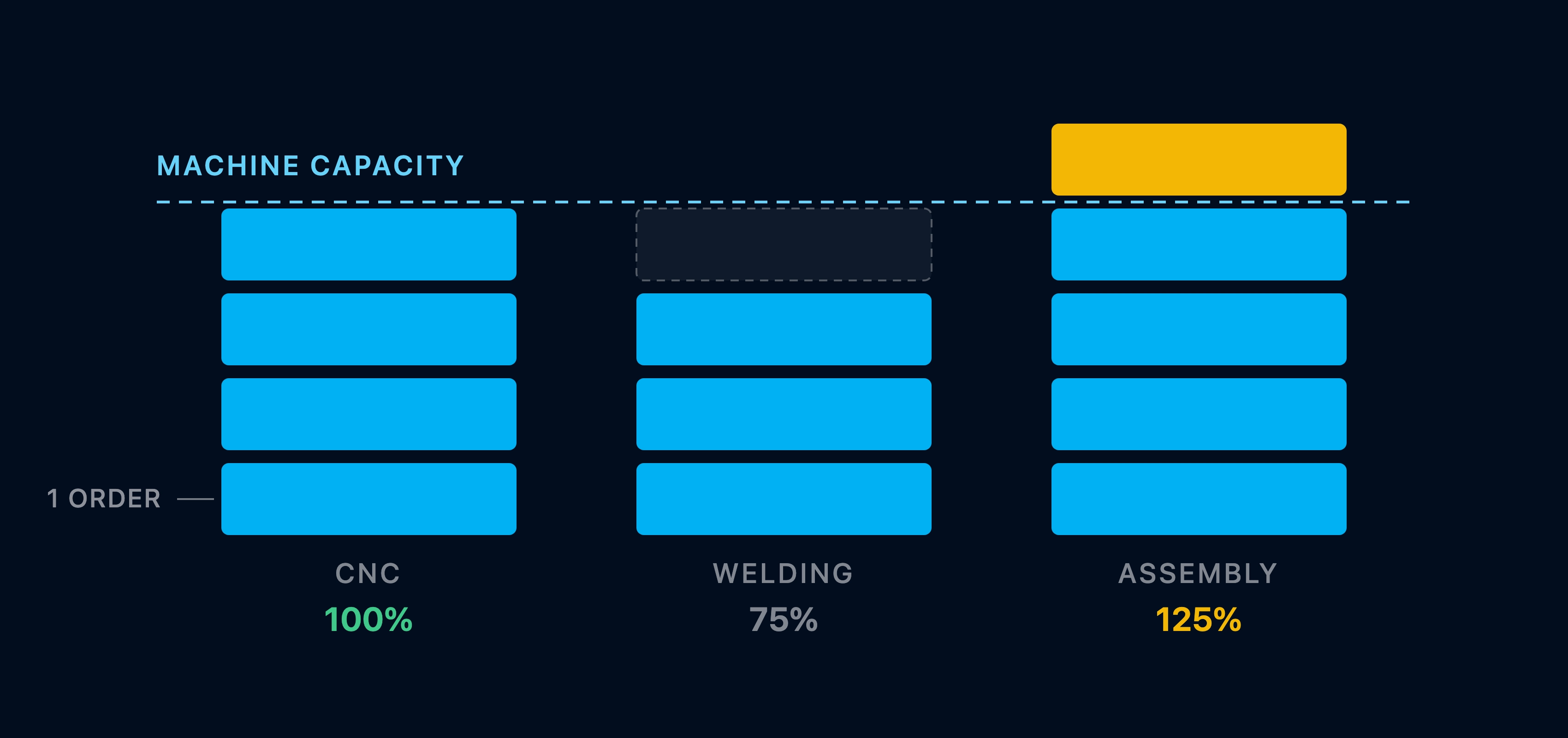
Organize your manufacturing orders into groups, defined by the characteristics of the machines that will be used. Epifor shows to the planner all the neccessary information about the date range that wants to plan, availability and quantity in order to make the job of the planner simpler and efficient. AI algorithms suggest groups to the planners and to operators
Filter the orders with characteristics and date range and build the groups
Filter by material or dimension and group to meet capacity of the machines such as sqm, meters, cubic meters or cutting lenghts.
Show groups to the work centers with priority
Operators see the grouped manufacturing orders in priority, starting and finishing the groups which contain the proper quantity of each order.
Traceability of the group
The whole quantity of a manufacturing order could be produced from different groups. Epifor keeps records of all the produced quantity per group with groups unique identification number for traceability reasons.
Operator Skills (Coming Soon)
Match the right person to the job.
Coming soon. Define what each operator is skilled to do and Epifor will steer work to the people qualified for it, so a job reaches an operator who can run it and skill gaps show up before they slow you down.
Define skills
Record what each operator is trained and qualified to do
Match work to people
Epifor will display jobs to the operators skilled for them
See the gaps
Spot where an operator needs training before it holds up a job
Over-Under Production
Manage orders that run over or under production
Every job has an ordered quantity. Epifor can manage the produced quantity even if it is completed between an over & under percentage. Over & Under percentage ranges are coming directly from the ERP per manufacturing order.
Over & under production percentage
Available percetage rates are different for over and under production limits. Unlimeted rate is also supported.
Back to ERP when the work center completes its job
When a work center has completed its job, operators push a Final Completion button that triggers a flag to ERP to close the phase irrelevant from the quantity completion.
Rework and scrap declaration in supported
Rework quantity and Epifor will show the appropriate information to the appropriate work center taking into consideration the over & under percentage. The same is happening with scrap declaration.
Frequently asked questions
Q.01What is work center group planning?
It is planning across a set of work centers instead of one at a time. In Epifor, you organize work centers into groups by their productivity, hours and planned downtime, then a job can run on whichever member of the group has capacity, so load balances across the group inside the shop floor management system.
Q.02Why plan by group instead of by single work center?
Because it uses your capacity better. When several work centers can do the same job, planning them as a group lets Epifor place work where there is room, rather than queuing it on one station while others sit idle.
Q.03How do I set up a work center group?
You define your work centers and organize them into groups based on productivity, working hours, and planned downtime. Epifor then treats the group as one pool of capacity when it schedules.
Q.04What is Operator Skills?
Operator Skills is a coming soon capability. It will let you record what each operator is qualified to do and route work to the people skilled for it, so the right operator is on the right job and skill gaps surface early. It is not live yet.
Q.05What is over and under production?
It is the gap between what a job was ordered to make and what it actually produced. Overproduction is extra units beyond the order; underproduction is a shortfall. Epifor tracks the produced quantity against the ordered quantity so both are visible.
Q.06Why does tracking over and under production matter?
Because both cost you. Overproduction ties up material and time in units nobody ordered, and a shortfall can miss a customer's quantity. Seeing the variance as the job closes lets you act on it, rather than finding out later.
Q.07Does this replace my ERP?
No. Your ERP holds the orders and the master data, which is its job. Epifor adds the shop floor layer: it plans the work center groups, tracks actual quantities and reports back. It complements your ERP rather than replacing it.
Q.08Do these capabilities work together?
Yes. Group planning decides where a job runs, Operator Skills will decide who runs it and over and under production tracks how much came out. Together they give a production manager finer control over the floor.
Free online presentation
See it in action
Book a short presentation and see how Epifor plans across work center groups, tracks over and under production against the order and where operator skills matching is headed, all inside one shop floor management system.