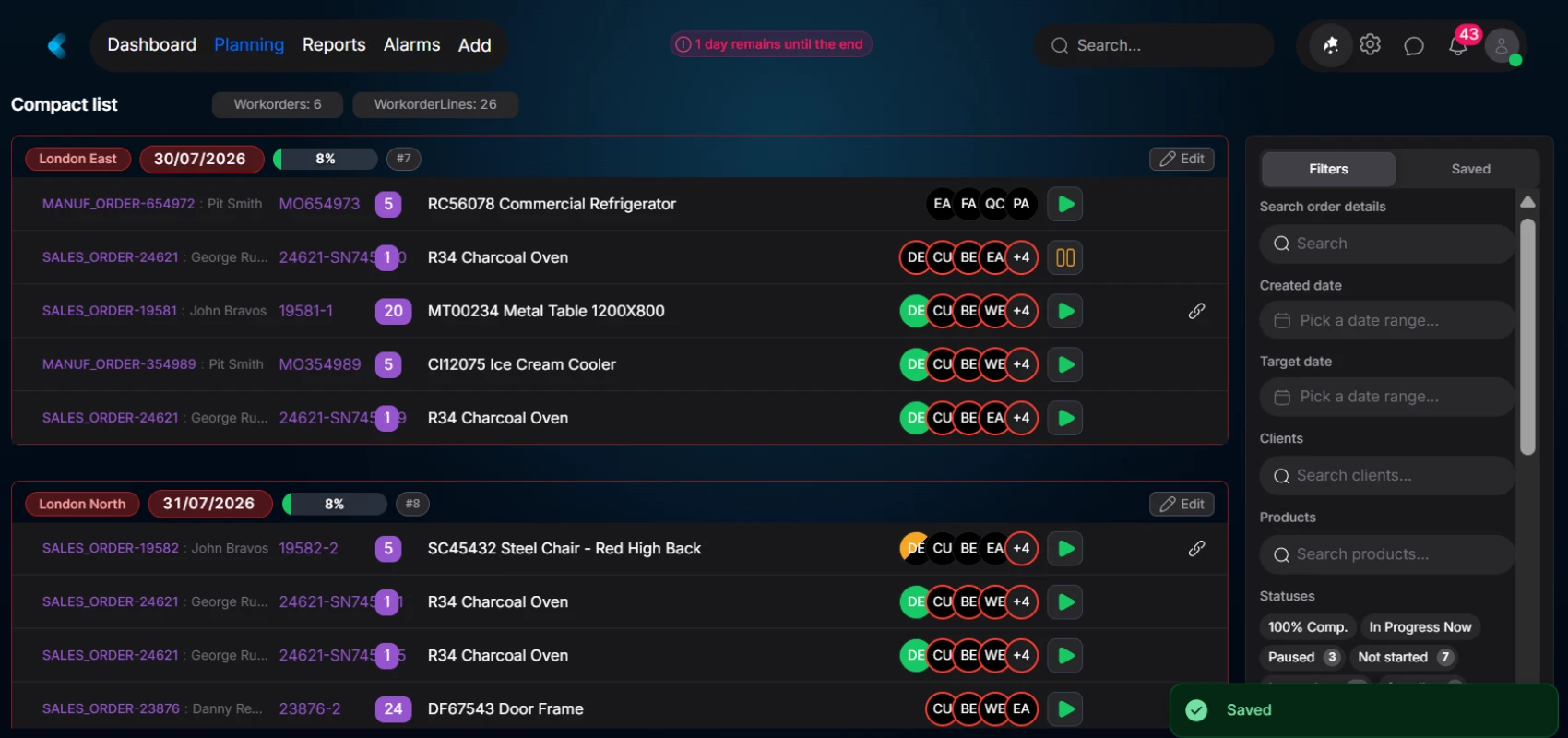
Manage your truck loads of your finished goods and see the completion progress prior to the loadings. Plan your truck loads and let Epifor priorities the jobs taking into consideration your scheduled plan and the truck loadings, automatically.
Epifor's Truck Loading Management closes the loop between production and truck load visibility and prioritization. It is mostly used for finished goods and not for several parts or packages.
Truck Loading Management
Manufacturer, load, dispatch.
Truck is the priority. Plan your truck loads and Epifor smart scheduling algorythms will push the production to the desired truck load date. See the progress of the load in real time and confirm the loading right from the shop floor.
Plan the truck load
Assign finished goods to a truck, with date and description
See the progress
See the progress of the manufacturing orders and the progress of the truck load
Automated priority
When a manufacturing order is assigned to a truck load, the priority changes by inheriting the truck load date and changing all the terminals instanlty
Frequently asked questions
Q.01What is truck loading management software?
For manufacturers, truck loading management software handles loading finished goods onto outbound trucks: building the load, verifying items as they go on, and confirming dispatch. In Epifor, it runs inside the shop floor management system, so the load is built from the jobs you already track, not a separate trucking or fleet system.
Q.02How does Epifor make sure the right items go on each truck?
You scan each item as it's loaded and Epifor checks it against the load list in real time. Items that belong on the truck are confirmed; anything unexpected is flagged before it leaves. The result is the right items on the right truck, every time.
Q.03Do I need extra hardware to scan?
No. Loading uses the same browser and barcodes as the rest of Epifor, so any tablet or scanner on the dock works. There is nothing new to install.
Q.04Does it connect to the jobs I already track?
Yes. Because it's part of the same shop floor management system, loads are built directly from finished jobs, no re-entering data and no paper load slips.
Q.05Can I see loading status in real time?
Yes. You can see which trucks are loading, what's on board, and what's left as it happens. Managers and sales get the same live view.
Q.06Does it keep a record of what was loaded and shipped?
Yes. Every load keeps a complete record of items, quantities, truck, and time, ready for delivery notes, customer queries and audits.
Q.07Can I manage several trucks at once?
Yes. Build and track multiple loads in parallel, each with its own list and destination.
Q.08Can loading trigger updates elsewhere?
Yes. With Smart Workflows, dispatching a truck can update the order, notify sales, or alert the customer automatically, so the right people know the moment a load leaves.
Free online presentation
See loading done right
Book a short presentation and see how Epifor can run your floor from production to dispatch, all inside one shop floor management system.